BGP(Boarder Gateway Routing protocol)
It is an EGP Protocol (it can form neighborship between two different AS's)
It is a Path Vector routing Protocol (it uses multiple attributes to select best path)
It is highly scalable than IGP (it can have lakhs of routes in its BGP table)
It is reliable protocol (it uses TCP)
It uses TCP port number 179 before establish neighborship it have to form TCP connection (three way hand shake process).
only BGP is fully reliable routing protocol.
It is more secure than any other routing protocol because all message will travel on TCP protocol
It is a classless routing protocol
It support manual summarization
Administrative Distance: IBGP 200, EBGP 20.
A.S. size is 2bytes(0-65535) and 4bytes(0.0-65535.65535).
Public A.S= 1 to 64511, Private AS=64512 to 65534.
BGP doesn't support dynamic neighbor discovery.
it supports only md5 authentication
BGP convergence is slow as compare to IGP.
Note:we can't configure more than one AS on a single router.
Note:BGP sends all type of packets as unicast
AS (Autonomous System):
In the world of BGP, each routing domain is known as an Autonomous System, or AS.
Like IP addresses, Autonomous System Numbers have to be unique on the Internet.
An AS is a collection of networks under a single administrative domain.
The Internet is nothing more but a bunch of AS that are connected to each other.
Within an Autonomous System, use an IGP like OSPF, RIP, ISIS or EIGRP.
Between different Autonomous Systems, use an External Gateway Protocol.
BGP uses the Autonomous System (AS) number for its loop prevention mechanism.
Autonomous System numbers are 16-Bit or 2-Octed Autonomous System numbers.
BGP Flavors:
There are two flavors of BGP Internal BGP and External BGP.
IBGP (Interior Border Gateway Protocol):
- If the peers are in the same AS called Internal BGP (iBGP).
- Internal BGP (IBGP) is between the same Autonomous System Number.
- Routes learned from IBGP peer will not be advertised to other IBGP peers.
- By default, Internal BGP (IBGP) peers are set with TTL value = 255
- Internal BGP (IBGP) routes have an Administrative Distance of 200.
- Next hop remains unchanged when route is advertised to IBGP peer.
- Internal BGP (IBGP) peers do not need to be directly connected.
EBGP (Exterior Border Gateway Protocol):
- If peers are in a different AS called external BGP (eBGP).
- EBGP is peering between two different Autonomous System (AS).
- Routes learned from eBGP peer will be advertised to other peers.
- EBGP peers are set with TTL = 1, means neighbors directly connected.
- External BGP (EBGP) routes have Administrative Distance of 20.
- Next hop changed when it is advertised to EBGP peer by default.
- External BGP (EBGP) the neighbors need to be connected directly.
Types of Messages in BGP:
For communication with the peer/NBR BGP uses the 5th type of message which has been
demonstrated below.
1. Open message
2. Keep-alive message
3. Update message
4. Notification message
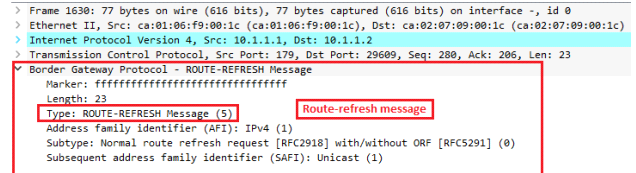
5. Route-refresh message
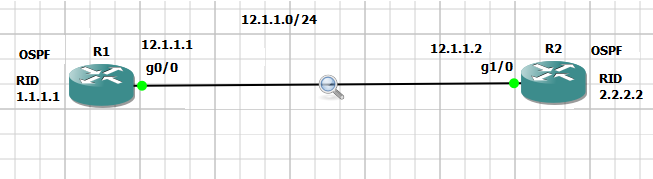
Now I’m using one simple topology to understand BGP’s message
1. Open message –
The OPEN message is used to establish a BGP adjacency. Or you can say that--
➢This is the first message of BGP Protocol
➢Once TCP connection / Three way handshake process is established then open message will be
sent, open message does not send periodically with the NBR.
➢Open message is exchanged by the BGP to exchange initial configuration with neighbors (NBR)
such as –
1. Message type
2. BGP version
3. Own AS (autonomous number)
4. Hold down timer -180sec
5. BGP identifier (Router-id)
So far we have discussed about open message’s theory, now it’s time to prove it that it is happing same
what we have discussed, I have illustrated a screenshot to understand a little bit using simple packet
Capture
2. Keep-alive message.
1. Keep –alive messages are sent periodically after every 60sec.
2. It is used to inform to the neighbor that still I’m alive, If any router does not receive
keep-alive message within hold down timer 180sec then it will assume that neighbor
may be down or something else issue then it will immediately break the neighbor-ship
with the its NBR.
3. Keep-alive message’s type code is –4.
3. Update message –
1. It is used to exchange prefix information/Network information with its neighbors.
2. Or you can say that Update packets will be responsible to carry routes information.
There are some field contains in updates message –
A. Path Attributes: Some criteria used by selection of best path.
B. Prefix info/NLRI: Network layer reach -ability information.
C. Withdrawn routes: The prefix that goes down.
Note –Still, I didn’t advertised prefix (192.168.1.0/28) using BGP network command, let’s
advertised what happens once we advertise it.
The moment you advertise prefix 192.168.1.0/28 using bgp command #network
192.168.1.0 mask 255.255.255.240 then BGP will send immediately update message
towards its neighbor.
Now we will check what information will be contain in update message –
4. Notification Message:
1. A BGP notification message is sent when an error condition is detected.
2. Notification messages include an error code, an error sub code, and data related to the error.
1. Notification message will be sent, in case of error detection and this message would inform its
neighbor case of problem.
Now lets see notification message just putting wrong as on R2 router –
R2(config-router)#neighbor 10.1.1.1 remote-as 100
5: Route-refresh message –
1. Route refresh capability is the most preferred method…when you change your BGP
policy you just send a message to your BGP neighbor and it will re-send you all its
prefixes, there will be no disruption at all.
2. Whenever you will change BGP policy/configuration, you might be run the command -
clear ip bgp * soft in/out at that time you can check route-refresh message.
3. A soft reset allows the application of a new or changed policy without clearing an active
BGP session. The route-refresh feature allows a soft reset to occur on a per-neighbor
basis and does not require reconfiguration or extra memory. A dynamic inbound soft
reset generates inbound updates from a neighbor.
Recommendation for you-# clear ip bgp * soft in/out this command can be harmful for
your organization if you network is live, make sure you know the meaning of this command
then use it.
FSM(finite state mechnism) of BGP / BGP neighborship states
1 Idle:neighbor shutdown / waiting for start 3-way handshake.
2 Connect:try to form TCP connection, but wan't be confirmed
3 Active:TCP connection not completed, retrying to form tcp connection
4 Open-sent:TCP connection completed and sent open msg.
5 Open-confirm:exchanged open msg, perameter agreed, send keep-alive after 60sec
6 Established:peering completed, update is exhanged.
IGPs, such as EIGRP or OSPF, choose routes based on lowest metric. They attempt to find the shortest, fastest way to get traffic to its destination. BGP, however, has a different way of route selection. It assigns various attributes to each path; these attributes can be administratively manipulated to control the path that is selected.
• RIP selects the path with the lowest hop count.
• OSPF selects the path with the lowest cost.
• EIGRP selects the path with the highest bandwidth and lowest delay (unless you change the K values)
• BGP –best path depends on the attributes.
BGP selects the best path based on a list of attributes.
Point to be noted
Path attributes –
Path attributes is one kind of criteria which is used for best path selection in bgp.
BGP chooses a route to a network based on the attributes of its path. Four categories of attributes exist as follows:
Well-known mandatory –
Must be recognized by all BGP routers, present in all BGP updates, and passed on to other BGP routers. Such as -Next hop AS path, origin code.
Well-known discretionary –
Must be recognized by all BGP routers and passed on to other BGP routers but need not be present in an update, such as -local preference.
Optional transitive –
Might or might not be recognized by a BGP router but is passed on to other BGP routers. If not recognized, it is marked as partial, such as Aggregator, community.
Optional nontransitive –
Might or might not be recognized by a BGP router and is not passed on to other routers, for such as -Multi-Exit Discriminator (MED), originator ID. Best path selection attributes in BGP
Labels: BGP Deep Dive, OSPF, Subnetting, Switching Deep Dive